


Page 94 - LIT-18626-13-49
P. 94
SportsBoat_F3R15.book  Page 85  Friday, May 14, 2021  11:12 AM


                        Instrument operation


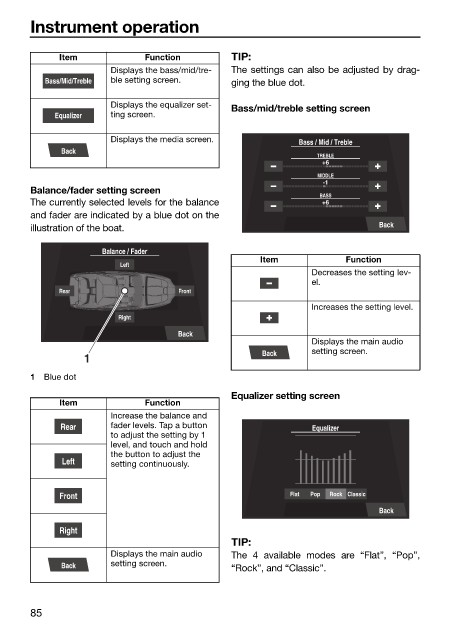
                              Item            Function        TIP:
                                       Displays the bass/mid/tre-  The settings can also be adjusted by drag-
                           Bass/Mid/Treble  ble setting screen.  ging the blue dot.

                                       Displays the equalizer set-  Bass/mid/treble setting screen
                             Equalizer  ting screen.

                                       Displays the media screen.
                                                                          Bass / Mid / Treble
                              Back
                                                                              TREBLE
                                                                               +6
                                                                              MIDDLE
                                                                               -1
                        Balance/fader setting screen
                                                                              BASS
                        The currently selected levels for the balance          +6
                        and fader are indicated by a blue dot on the
                        illustration of the boat.                                        Back
                                      Balance / Fader
                                                                   Item            Function
                                         Left
                                                                             Decreases the setting lev-
                                                                             el.
                              Rear                  Front
                                                                             Increases the setting level.
                                         Right
                                                    Back
                                                                             Displays the main audio
                                                                   Back      setting screen.
                                  1
                        1  Blue dot
                                                              Equalizer setting screen
                              Item            Function
                                       Increase the balance and
                              Rear     fader levels. Tap a button            Equalizer
                                       to adjust the setting by 1
                                       level, and touch and hold
                                       the button to adjust the
                              Left     setting continuously.


                              Front                                      Flat  Pop  Rock  Classic
                                                                                         Back

                              Right
                                                              TIP:
                                       Displays the main audio   The 4  available modes are  “Flat”,  “Pop”,
                              Back     setting screen.        “Rock”, and “Classic”.


                        85

