Page 92 - LIT-18626-13-49
P. 92

SportsBoat_F3R15.book  Page 83  Friday, May 14, 2021  11:12 AM


                        Instrument operation

                          beginning the  pairing process to reduce
                          connection issues.
                                                                            Auxiliary
                        (2) Select the multi-function display unit of
                            the boat to connect to it.
                        TIP:
                        When an external device is connected using
                        Bluetooth wireless technology,  the audio
                        tracks will automatically start playing.
                                                                  Settings               Source
                        To disconnect an external device:
                        Tap  the “  Turn OFF  ” button to disconnect
                        the connected device.
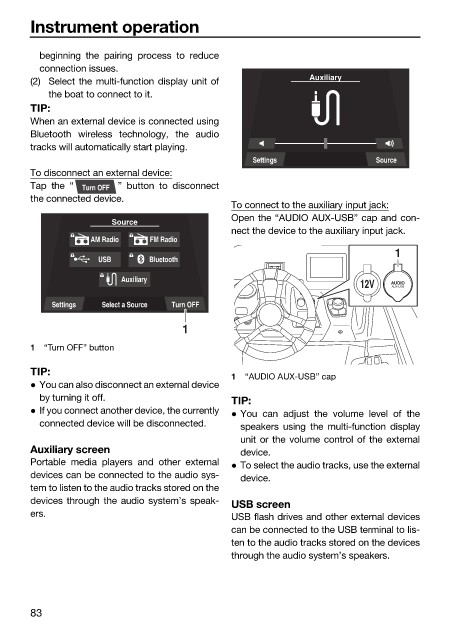
                                                              To connect to the auxiliary input jack:
                                                              Open the “AUDIO AUX-USB” cap and con-
                                       Source
                                                              nect the device to the auxiliary input jack.
                                   AM Radio    FM Radio
                                                                                            1
                                     USB      Bluetooth

                                         Auxiliary
                                                                                      12V  AUDIO
                                                                                            AUX-USB
                            Settings  Select a Source  Turn OFF
                                                     1
                        1  “Turn OFF” button

                        TIP:
                                                              1  “AUDIO AUX-USB” cap
                         You can also disconnect an external device
                          by turning it off.                  TIP:
                         If you connect another device, the currently   You can adjust the volume level of  the
                          connected device will be disconnected.  speakers using the multi-function display
                                                               unit or the volume control of the external
                        Auxiliary screen                       device.
                        Portable media players  and other external   To select the audio tracks, use the external
                        devices can be connected to the audio sys-  device.
                        tem to listen to the audio tracks stored on the
                        devices through the audio system’s speak-
                                                              USB screen
                        ers.                                  USB flash drives and other external devices
                                                              can be connected to the USB terminal to lis-
                                                              ten to the audio tracks stored on the devices
                                                              through the audio system’s speakers.


                        83
   87   88   89   90   91   92   93   94   95   96   97