


Page 95 - LIT-18626-13-49
P. 95
SportsBoat_F3R15.book  Page 86  Friday, May 14, 2021  11:12 AM


                                                                 Instrument operation

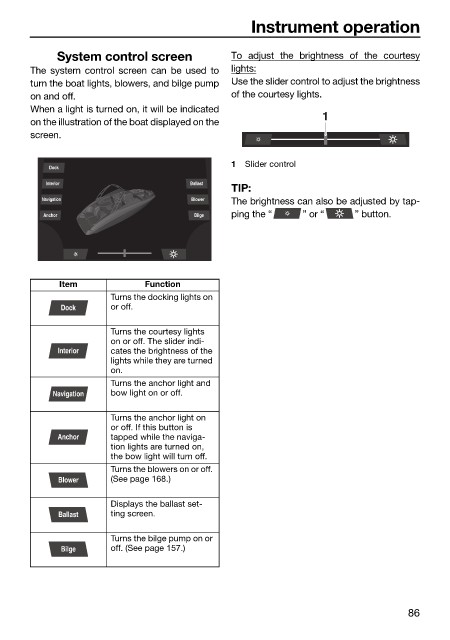
                             System control screen            To  adjust the brightness  of the  courtesy
                        The system control screen can be used to  lights:
                        turn the boat lights, blowers, and bilge pump  Use the slider control to adjust the brightness
                        on and off.                           of the courtesy lights.
                        When a light is turned on, it will be indicated        1
                        on the illustration of the boat displayed on the
                        screen.

                                                              1  Slider control
                            Dock
                           Interior                   Ballast
                                                              TIP:
                          Navigation                  Blower  The brightness can also be adjusted by tap-
                           Anchor                      Bilge  ping the “   ” or “    ” button.


                              Item            Function
                                       Turns the docking lights on
                              Dock     or off.

                                       Turns the courtesy lights
                                       on or off. The slider indi-
                             Interior  cates the brightness of the
                                       lights while they are turned
                                       on.
                                       Turns the anchor light and
                            Navigation  bow light on or off.

                                       Turns the anchor light on
                                       or off. If this button is
                             Anchor    tapped while the naviga-
                                       tion lights are turned on,
                                       the bow light will turn off.
                                       Turns the blowers on or off.
                             Blower    (See page 168.)

                                       Displays the ballast set-
                             Ballast   ting screen.

                                       Turns the bilge pump on or
                              Bilge    off. (See page 157.)


                                                                                               86

