


Page 91 - LIT-18626-13-49
P. 91
SportsBoat_F3R15.book Page 82 Friday, May 14, 2021 11:12 AM
Instrument operation
ten to the audio tracks stored on the devices Audio track information
through the audio system’s speakers.
Bluetooth - Connect Device ...
Bluetooth - Connect Device ... 1 Paradise Circus
2 Massive Attack
3 Heligoland
Settings Source
Settings Source
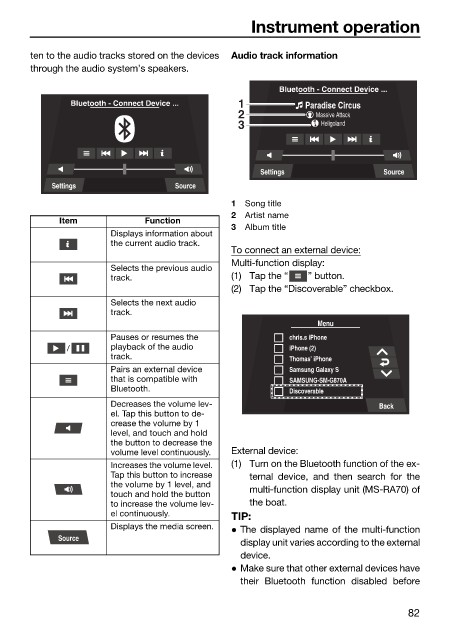
1 Song title
2 Artist name
Item Function
3 Album title
Displays information about
the current audio track.
To connect an external device:
Multi-function display:
Selects the previous audio
track. (1) Tap the “ ” button.
(2) Tap the “Discoverable” checkbox.
Selects the next audio
track.
Menu
Pauses or resumes the chris.s iPhone
/ playback of the audio iPhone (2)
track. Thomas’ iPhone
Pairs an external device Samsung Galaxy S
that is compatible with SAMSUNG-SM-G870A
Bluetooth. Discoverable
Decreases the volume lev- Back
el. Tap this button to de-
crease the volume by 1
level, and touch and hold
the button to decrease the
volume level continuously. External device:
Increases the volume level. (1) Turn on the Bluetooth function of the ex-
Tap this button to increase ternal device, and then search for the
the volume by 1 level, and
touch and hold the button multi-function display unit (MS-RA70) of
to increase the volume lev- the boat.
el continuously. TIP:
Displays the media screen. The displayed name of the multi-function
Source
display unit varies according to the external
device.
Make sure that other external devices have
their Bluetooth function disabled before
82

