


Page 89 - LIT-18626-13-49
P. 89
SportsBoat_F3R15.book  Page 80  Friday, May 14, 2021  11:12 AM


                                                                 Instrument operation


                             Name            Function                   Media screen
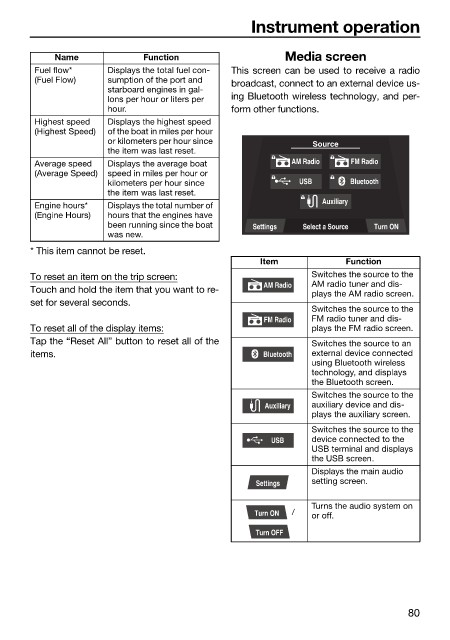
                         Fuel flow*    Displays the total fuel con-  This screen can be used to receive a radio
                         (Fuel Flow)   sumption of the port and   broadcast, connect to an external device us-
                                       starboard engines in gal-
                                       lons per hour or liters per   ing Bluetooth wireless technology, and per-
                                       hour.                  form other functions.
                         Highest speed   Displays the highest speed
                         (Highest Speed)  of the boat in miles per hour
                                       or kilometers per hour since          Source
                                       the item was last reset.
                         Average speed   Displays the average boat       AM Radio   FM Radio
                         (Average Speed)  speed in miles per hour or
                                       kilometers per hour since          USB       Bluetooth
                                       the item was last reset.
                                                                               Auxiliary
                         Engine hours*   Displays the total number of
                         (Engine Hours)  hours that the engines have
                                       been running since the boat   Settings  Select a Source  Turn ON
                                       was new.
                        * This item cannot be reset.
                                                                   Item            Function
                        To reset an item on the trip screen:                 Switches the source to the
                                                                    AM Radio  AM radio tuner and dis-
                        Touch and hold the item that you want to re-         plays the AM radio screen.
                        set for several seconds.
                                                                             Switches the source to the
                                                                    FM Radio  FM radio tuner and dis-
                        To reset all of the display items:                   plays the FM radio screen.
                        Tap the “Reset All” button to reset all of the       Switches the source to an
                        items.                                      Bluetooth  external device connected
                                                                             using Bluetooth wireless
                                                                             technology, and displays
                                                                             the Bluetooth screen.
                                                                             Switches the source to the
                                                                    Auxiliary  auxiliary device and dis-
                                                                             plays the auxiliary screen.
                                                                             Switches the source to the
                                                                     USB     device connected to the
                                                                             USB terminal and displays
                                                                             the USB screen.
                                                                             Displays the main audio
                                                                  Settings   setting screen.

                                                                             Turns the audio system on
                                                                  Turn ON   /   or off.
                                                                  Turn OFF


                                                                                               80

