


Page 90 - LIT-18626-13-49
P. 90
SportsBoat_F3R15.book  Page 81  Friday, May 14, 2021  11:12 AM


                        Instrument operation

                        To change the volume:                      Item            Function
                        The following slider is displayed in each            Decreases the volume lev-
                        screen.                                              el. Tap this button to de-
                                                                             crease the volume by 1
                                         1                                   level, and touch and hold
                                                                             the button to decrease the
                                                                             volume level continuously.
                                                                             Increases the volume level.
                                                                             Tap this button to increase
                        1  Slider control                                    the volume by 1 level, and
                                                                             touch and hold the button
                        To decrease the volume level, drag the slider        to increase the volume lev-
                                                                             el continuously.
                        to the left. To increase the volume level, drag
                                                                             Displays the media screen.
                        the slider to the right.
                                                                   Source
                        TIP:
                        The lock mark “  ” appears when the entire
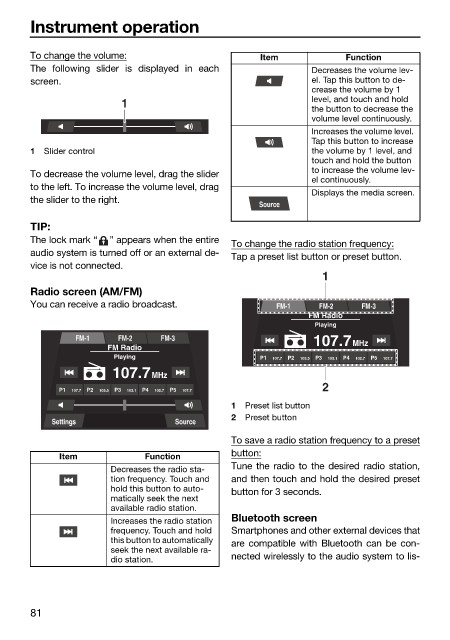
                                                              To change the radio station frequency:
                        audio system is turned off or an external de-
                                                              Tap a preset list button or preset button.
                        vice is not connected.
                                                                               1
                        Radio screen (AM/FM)
                        You can receive a radio broadcast.            FM-1    FM-2    FM-3
                                                                            FM Radio
                                                                             Playing
                                 FM-1    FM-2    FM-3
                                       FM Radio                              107.7MHz
                                        Playing                    P1  107.7  P2  103.5  P3  103.1  P4  102.7  P5  107.7
                                        107.7MHz
                                                                               2
                              P1  107.7  P2  103.5  P3  103.1  P4  102.7  P5  107.7
                                                              1  Preset list button
                                                              2  Preset button
                            Settings               Source
                                                              To save a radio station frequency to a preset
                                                              button:
                              Item            Function
                                                              Tune the radio to the desired radio station,
                                       Decreases the radio sta-
                                       tion frequency. Touch and   and then touch and hold the desired preset
                                       hold this button to auto-  button for 3 seconds.
                                       matically seek the next
                                       available radio station.
                                       Increases the radio station   Bluetooth screen
                                       frequency. Touch and hold   Smartphones and other external devices that
                                       this button to automatically   are compatible with Bluetooth can be con-
                                       seek the next available ra-
                                       dio station.           nected wirelessly to the audio system to lis-


                        81

