


Page 67 - LIT-18626-13-50
P. 67
SportsBoat_F4V13.book  Page 59  Friday, May 21, 2021  11:45 AM


                                                                 Instrument operation


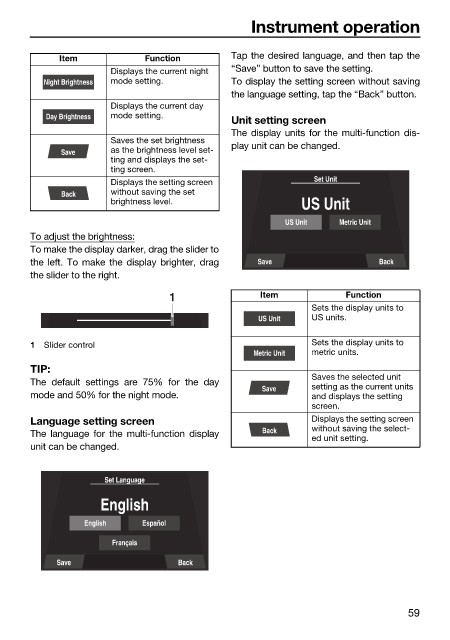
                              Item            Function        Tap the desired language, and then tap the
                                       Displays the current night   “Save” button to save the setting.
                           Night Brightness  mode setting.    To display the setting screen without saving
                                                              the language setting, tap the “Back” button.
                                       Displays the current day
                           Day Brightness  mode setting.
                                                              Unit setting screen
                                                              The display units for the multi-function dis-
                                       Saves the set brightness
                              Save     as the brightness level set-  play unit can be changed.
                                       ting and displays the set-
                                       ting screen.
                                       Displays the setting screen           Set Unit
                              Back     without saving the set
                                       brightness level.                   US Unit
                                                                        US Unit   Metric Unit
                        To adjust the brightness:
                        To make the display darker, drag the slider to
                        the left. To make the display brighter, drag  Save               Back
                        the slider to the right.

                                                  1                Item            Function
                                                                             Sets the display units to
                                                                   US Unit   US units.

                        1  Slider control                                    Sets the display units to
                                                                  Metric Unit  metric units.
                        TIP:
                                                                             Saves the selected unit
                        The default settings are 75%  for  the  day
                                                                   Save      setting as the current units
                        mode and 50% for the night mode.                     and displays the setting
                                                                             screen.
                        Language setting screen                              Displays the setting screen
                                                                             without saving the select-
                        The language for the  multi-function  display  Back
                                                                             ed unit setting.
                        unit can be changed.

                                      Set Language
                                     English

                                  English    Español
                                       Français
                             Save                   Back


                                                                                               59

