


Page 68 - LIT-18626-13-50
P. 68
SportsBoat_F4V13.book  Page 60  Friday, May 21, 2021  11:45 AM


                        Instrument operation

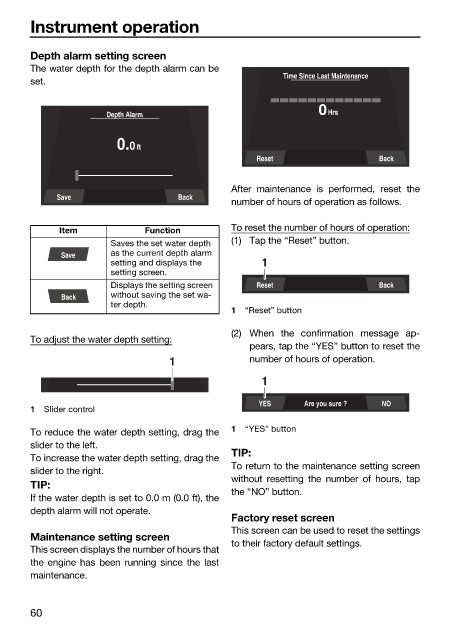
                        Depth alarm setting screen
                        The water depth for the depth alarm can be
                                                                       Time Since Last Maintenance
                        set.

                                      Depth Alarm                             0Hrs


                                        0.0 ft
                                                                  Reset                  Back

                                                              After maintenance  is performed, reset  the
                             Save                   Back
                                                              number of hours of operation as follows.

                              Item            Function        To reset the number of hours of operation:
                                       Saves the set water depth   (1) Tap the “Reset” button.
                              Save     as the current depth alarm
                                       setting and displays the    1
                                       setting screen.
                                       Displays the setting screen   Reset               Back
                              Back     without saving the set wa-
                                       ter depth.
                                                              1  “Reset” button
                                                              (2) When the confirmation message ap-
                        To adjust the water depth setting:
                                                                 pears, tap the “YES” button to reset the
                                                  1              number of hours of operation.
                                                                   1

                                                                   YES     Are you sure ?  NO
                        1  Slider control
                        To reduce the water depth setting, drag the  1  “YES” button
                        slider to the left.
                                                              TIP:
                        To increase the water depth setting, drag the
                                                              To return to the maintenance setting screen
                        slider to the right.
                                                              without  resetting the number of hours, tap
                        TIP:
                                                              the “NO” button.
                        If the water depth is set to 0.0 m (0.0 ft), the
                        depth alarm will not operate.
                                                              Factory reset screen
                                                              This screen can be used to reset the settings
                        Maintenance setting screen
                                                              to their factory default settings.
                        This screen displays the number of hours that
                        the engine has been  running  since the  last
                        maintenance.

                        60

