


Page 62 - LIT-18626-13-50
P. 62
SportsBoat_F4V13.book Page 54 Friday, May 21, 2021 11:45 AM
Instrument operation
Item Function
Displays information about
the current audio track. Menu
chris.s iPhone
Selects the previous audio iPhone (2)
track. Thomas’ iPhone
Samsung Galaxy S
SAMSUNG-SM-G870A
Selects the next audio
track. Discoverable
Back
Pauses or resumes the
playback of the audio
track.
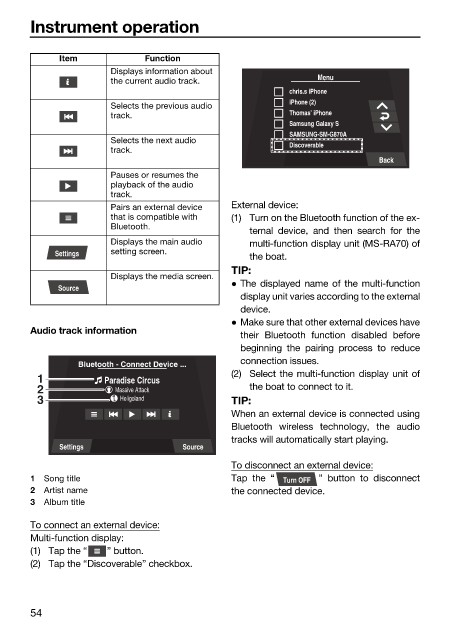
Pairs an external device External device:
that is compatible with (1) Turn on the Bluetooth function of the ex-
Bluetooth.
ternal device, and then search for the
Displays the main audio multi-function display unit (MS-RA70) of
Settings setting screen.
the boat.
TIP:
Displays the media screen.
The displayed name of the multi-function
Source
display unit varies according to the external
device.
Make sure that other external devices have
Audio track information
their Bluetooth function disabled before
beginning the pairing process to reduce
connection issues.
Bluetooth - Connect Device ...
(2) Select the multi-function display unit of
1 Paradise Circus
2 Massive Attack the boat to connect to it.
3 Heligoland TIP:
When an external device is connected using
Bluetooth wireless technology, the audio
tracks will automatically start playing.
Settings Source
To disconnect an external device:
1 Song title Tap the “ Turn OFF ” button to disconnect
2 Artist name the connected device.
3 Album title
To connect an external device:
Multi-function display:
(1) Tap the “ ” button.
(2) Tap the “Discoverable” checkbox.
54

