


Page 65 - LIT-18626-13-50
P. 65
SportsBoat_F4V13.book  Page 57  Friday, May 21, 2021  11:45 AM


                                                                 Instrument operation

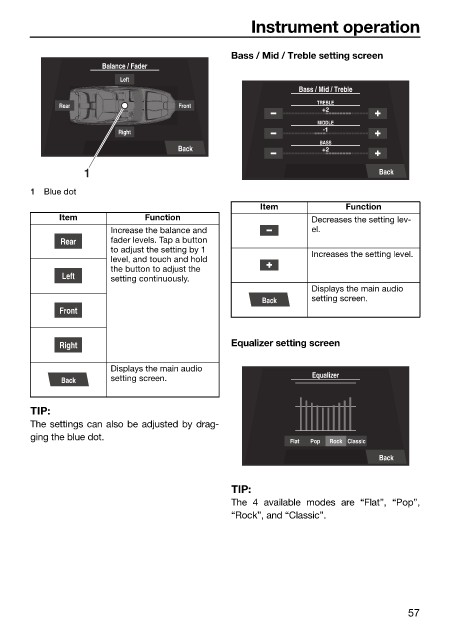
                                                              Bass / Mid / Treble setting screen
                                      Balance / Fader
                                         Left
                                                                          Bass / Mid / Treble
                                                                              TREBLE
                              Rear                  Front
                                                                               +2
                                                                              MIDDLE
                                                                               -1
                                         Right
                                                                              BASS
                                                    Back                       +2
                                  1                                                      Back
                        1  Blue dot
                                                                   Item            Function
                              Item            Function                       Decreases the setting lev-
                                       Increase the balance and              el.
                              Rear     fader levels. Tap a button
                                       to adjust the setting by 1            Increases the setting level.
                                       level, and touch and hold
                                       the button to adjust the
                              Left     setting continuously.
                                                                             Displays the main audio
                                                                   Back      setting screen.
                              Front


                              Right                           Equalizer setting screen

                                       Displays the main audio
                              Back     setting screen.                       Equalizer


                        TIP:
                        The settings can also be adjusted by drag-
                        ging the blue dot.
                                                                         Flat  Pop  Rock  Classic
                                                                                         Back


                                                              TIP:
                                                              The 4  available modes are  “Flat”,  “Pop”,
                                                              “Rock”, and “Classic”.


                                                                                               57

