Page 63 - LIT-18626-13-50
P. 63

SportsBoat_F4V13.book  Page 55  Friday, May 21, 2021  11:45 AM


                                                                 Instrument operation

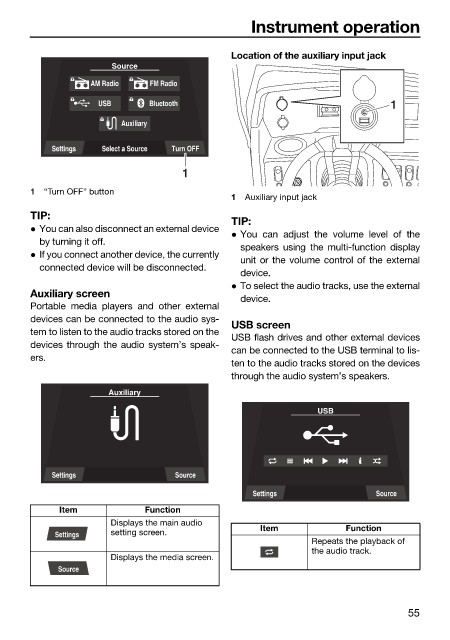
                                                              Location of the auxiliary input jack
                                       Source
                                   AM Radio    FM Radio
                                     USB      Bluetooth                                    1
                                         Auxiliary

                            Settings  Select a Source  Turn OFF

                                                     1
                        1  “Turn OFF” button
                                                              1  Auxiliary input jack
                        TIP:
                                                              TIP:
                         You can also disconnect an external device
                                                               You can adjust the volume level of  the
                          by turning it off.
                                                               speakers using the multi-function display
                         If you connect another device, the currently
                                                               unit or the volume control of the external
                          connected device will be disconnected.
                                                               device.
                                                               To select the audio tracks, use the external
                        Auxiliary screen                       device.
                        Portable media players  and other external
                        devices can be connected to the audio sys-
                                                              USB screen
                        tem to listen to the audio tracks stored on the
                                                              USB flash drives and other external devices
                        devices through the audio system’s speak-
                                                              can be connected to the USB terminal to lis-
                        ers.
                                                              ten to the audio tracks stored on the devices
                                                              through the audio system’s speakers.
                                       Auxiliary
                                                                              USB


                            Settings               Source
                                                                  Settings               Source
                              Item            Function
                                       Displays the main audio
                                                                   Item            Function
                             Settings  setting screen.
                                                                             Repeats the playback of
                                                                             the audio track.
                                       Displays the media screen.
                             Source


                                                                                               55
   58   59   60   61   62   63   64   65   66   67   68