


Page 123 - LIT-18626-13-49
P. 123
SportsBoat_F3R15.book  Page 114  Friday, May 14, 2021  11:12 AM


                                                                 Instrument operation

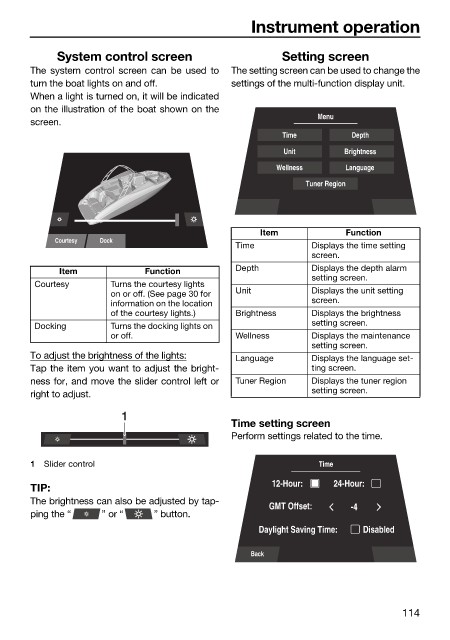
                             System control screen                     Setting screen
                        The system control screen can be used to  The setting screen can be used to change the
                        turn the boat lights on and off.      settings of the multi-function display unit.
                        When a light is turned on, it will be indicated
                        on the illustration of the boat shown on the
                                                                              Menu
                        screen.
                                                                       Time         Depth
                                                                       Unit        Brightness
                                                                      Wellness     Language
                                                                            Tuner Region


                                                                   Item            Function
                             Courtesy  Dock
                                                              Time           Displays the time setting
                                                                             screen.
                              Item            Function        Depth          Displays the depth alarm
                                                                             setting screen.
                         Courtesy      Turns the courtesy lights
                                       on or off. (See page 30 for   Unit    Displays the unit setting
                                       information on the location           screen.
                                       of the courtesy lights.)  Brightness  Displays the brightness
                         Docking       Turns the docking lights on           setting screen.
                                       or off.                Wellness       Displays the maintenance
                                                                             setting screen.
                        To adjust the brightness of the lights:  Language    Displays the language set-
                        Tap the item you want to adjust the bright-          ting screen.
                        ness for, and move the slider control left or  Tuner Region  Displays the tuner region
                        right to adjust.                                     setting screen.
                                         1
                                                              Time setting screen
                                                              Perform settings related to the time.

                        1  Slider control                                     Time

                        TIP:                                         12-Hour:    24-Hour:
                        The brightness can also be adjusted by tap-
                                                                     GMT Offset:    -4
                        ping the “    ” or “   ” button.
                                                                   Daylight Saving Time:  Disabled

                                                                 Back


                                                                                             114

