


Page 63 - LIT-18626-13-46
P. 63
SportsBoat_F4X13.book  Page 56  Friday, May 21, 2021  4:49 PM


                                                                 Instrument operation


                              Item            Function        Weather screen
                                       Increases the radio station   You can receive a weather broadcast.
                                       frequency. Touch and hold
                                       this button to automatically
                                       seek the next available ra-      NOAA National Weather
                                       dio station.
                         Source        Displays the media screen.
                                                                        CH 1 -0.000 kHz
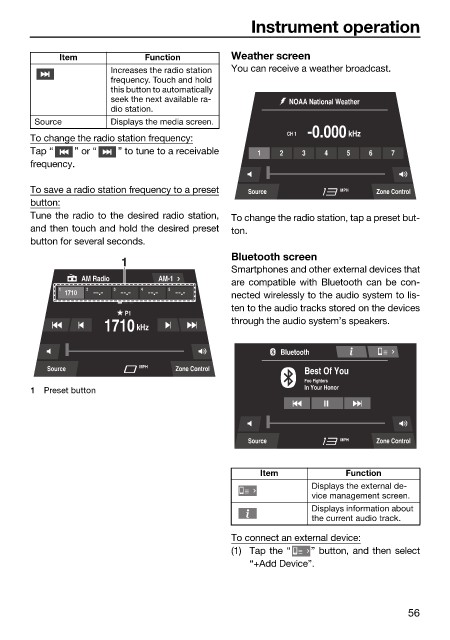
                        To change the radio station frequency:
                        Tap “   ” or “   ” to tune to a receivable  1  2   3   4   5   6   7
                        frequency.

                        To save a radio station frequency to a preset  Source     MPH    Zone Control
                        button:
                        Tune the radio to the desired radio station,  To change the radio station, tap a preset but-
                        and then touch and hold the desired preset  ton.
                        button for several seconds.
                                                              Bluetooth screen
                                         1
                                                              Smartphones and other external devices that
                                  AM Radio      AM-1
                                                              are compatible with Bluetooth can be con-
                              1    2    3    4    5
                               1710                           nected wirelessly to the audio system to lis-
                                                              ten to the audio tracks stored on the devices
                                          P1
                                                              through the audio system’s speakers.
                                      1710 kHz
                                                                       Bluetooth
                           Source            MPH   Zone Control            Best Of You
                                                                           Foo Fighters
                        1  Preset button                                   In Your Honor


                                                                 Source           MPH    Zone Control


                                                                   Item            Function
                                                                             Displays the external de-
                                                                             vice management screen.
                                                                             Displays information about
                                                                             the current audio track.

                                                              To connect an external device:
                                                              (1) Tap the “  ” button, and then select
                                                                 “+Add Device”.


                                                                                               56

