


Page 62 - LIT-18626-13-46
P. 62
SportsBoat_F4X13.book  Page 55  Friday, May 21, 2021  4:49 PM


                        Instrument operation

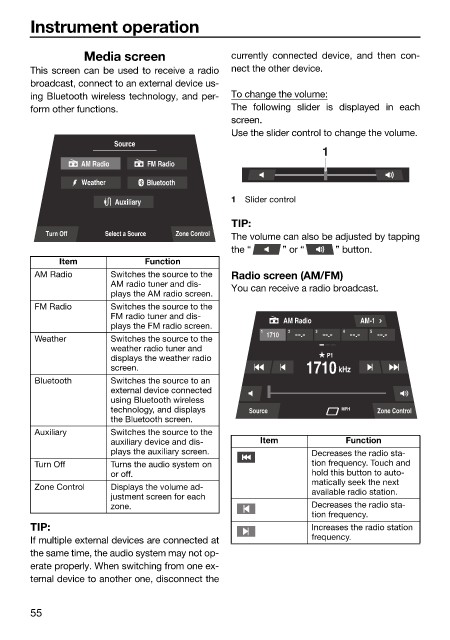
                                  Media screen                currently connected device, and  then  con-
                        This screen can be used to receive a radio  nect the other device.
                        broadcast, connect to an external device us-
                        ing Bluetooth wireless technology, and per-  To change the volume:
                        form other functions.                 The following slider is displayed in each
                                                              screen.
                                                              Use the slider control to change the volume.
                                        Source
                                                                               1
                                  AM Radio    FM Radio
                                  Weather     Bluetooth
                                        Auxiliary             1  Slider control

                                                              TIP:
                           Turn Off   Select a Source  Zone Control  The volume can also be adjusted by tapping
                                                              the “    ” or “    ” button.
                              Item            Function
                         AM Radio      Switches the source to the   Radio screen (AM/FM)
                                       AM radio tuner and dis-  You can receive a radio broadcast.
                                       plays the AM radio screen.
                         FM Radio      Switches the source to the
                                       FM radio tuner and dis-         AM Radio       AM-1
                                       plays the FM radio screen.
                                                                   1  1710  2  3  4     5
                         Weather       Switches the source to the
                                       weather radio tuner and
                                       displays the weather radio              P1
                                       screen.                              1710 kHz
                         Bluetooth     Switches the source to an
                                       external device connected
                                       using Bluetooth wireless
                                       technology, and displays   Source          MPH    Zone Control
                                       the Bluetooth screen.
                         Auxiliary     Switches the source to the
                                       auxiliary device and dis-   Item            Function
                                       plays the auxiliary screen.           Decreases the radio sta-
                         Turn Off      Turns the audio system on             tion frequency. Touch and
                                       or off.                               hold this button to auto-
                                                                             matically seek the next
                         Zone Control  Displays the volume ad-
                                       justment screen for each              available radio station.
                                       zone.                                 Decreases the radio sta-
                                                                             tion frequency.
                        TIP:                                                 Increases the radio station
                        If multiple external devices are connected at        frequency.
                        the same time, the audio system may not op-
                        erate properly. When switching from one ex-
                        ternal device to another one, disconnect the


                        55

