


Page 58 - LIT-18626-13-46
P. 58
SportsBoat_F4X13.book  Page 51  Friday, May 21, 2021  4:49 PM


                        Instrument operation

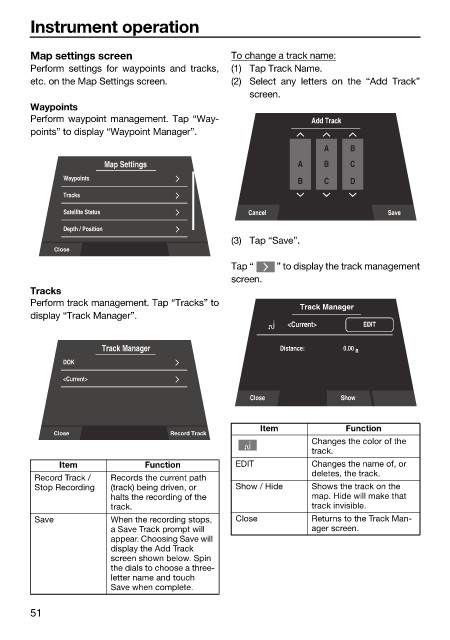
                        Map settings screen                   To change a track name:
                        Perform settings for  waypoints  and tracks,  (1) Tap Track Name.
                        etc. on the Map Settings screen.      (2) Select any letters on  the  “Add  Track”
                                                                 screen.
                        Waypoints
                        Perform waypoint management. Tap “Way-               Add Track
                        points” to display “Waypoint Manager”.
                                                                               A    B
                                      Map Settings                        A    B    C
                              Waypoints
                                                                          B    C    D
                              Tracks
                              Satellite Status                   Cancel                    Save
                              Depth / Position
                                                              (3) Tap “Save”.
                             Close
                                                              Tap “   ” to display the track management
                                                              screen.
                        Tracks
                        Perform track management. Tap “Tracks” to
                                                                          Track Manager
                        display “Track Manager”.
                                                                        <Current>     EDIT

                                      Track Manager                    Distance:    0.00  ft
                              DOK
                              <Current>
                                                                 Close            Show


                                                                   Item            Function
                             Close                Record Track
                                                                             Changes the color of the
                                                                             track.
                              Item            Function        EDIT           Changes the name of, or
                                                                             deletes, the track.
                         Record Track /   Records the current path
                         Stop Recording  (track) being driven, or   Show / Hide  Shows the track on the
                                       halts the recording of the            map. Hide will make that
                                       track.                                track invisible.
                         Save          When the recording stops,   Close     Returns to the Track Man-
                                       a Save Track prompt will              ager screen.
                                       appear. Choosing Save will
                                       display the Add Track
                                       screen shown below. Spin
                                       the dials to choose a three-
                                       letter name and touch
                                       Save when complete.

                        51

