Page 64 - LIT-18626-13-46
P. 64

SportsBoat_F4X13.book  Page 57  Friday, May 21, 2021  4:49 PM


                        Instrument operation

                        (2) Turn on the Bluetooth function of the ex-
                            ternal device, and  then search for  the                        1
                            multi-function display unit of the boat.
                        TIP:
                                                                                      5V
                        Make sure that other external devices have
                        their Bluetooth function disabled before be-
                        ginning the pairing  process to reduce  con-
                        nection issues.

                        (3) Tap the “Connect” button, and the “Con-
                            firm Pairing on  Device”  screen is dis-
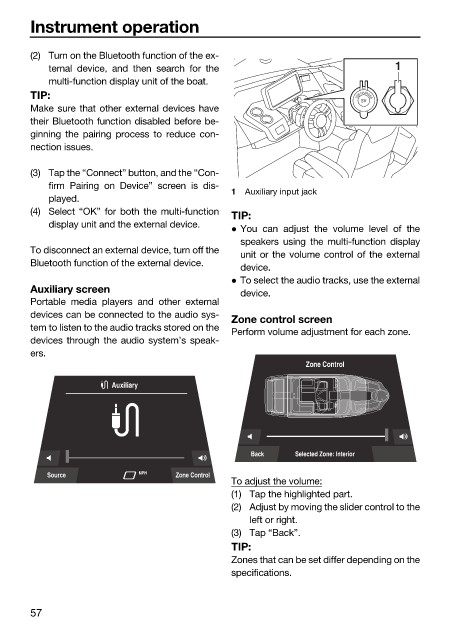
                                                              1  Auxiliary input jack
                            played.
                        (4) Select “OK” for both the multi-function
                                                              TIP:
                            display unit and the external device.
                                                               You can adjust the volume level of  the
                                                               speakers using the multi-function display
                        To disconnect an external device, turn off the
                                                               unit or the volume control of the external
                        Bluetooth function of the external device.
                                                               device.
                                                               To select the audio tracks, use the external
                        Auxiliary screen                       device.
                        Portable media players  and other external
                        devices can be connected to the audio sys-  Zone control screen
                        tem to listen to the audio tracks stored on the
                                                              Perform volume adjustment for each zone.
                        devices through the audio system’s speak-
                        ers.
                                                                            Zone Control

                                       Auxiliary


                                                                 Back     Selected Zone: Interior
                           Source           MPH    Zone Control
                                                              To adjust the volume:
                                                              (1) Tap the highlighted part.
                                                              (2) Adjust by moving the slider control to the
                                                                 left or right.
                                                              (3) Tap “Back”.
                                                              TIP:
                                                              Zones that can be set differ depending on the
                                                              specifications.


                        57
   59   60   61   62   63   64   65   66   67   68   69