


Page 70 - LIT-18626-15-36
P. 70
SportsBoat_F6D11.book  Page 60  Friday, May 24, 2024  5:40 PM


                        Instrument operation


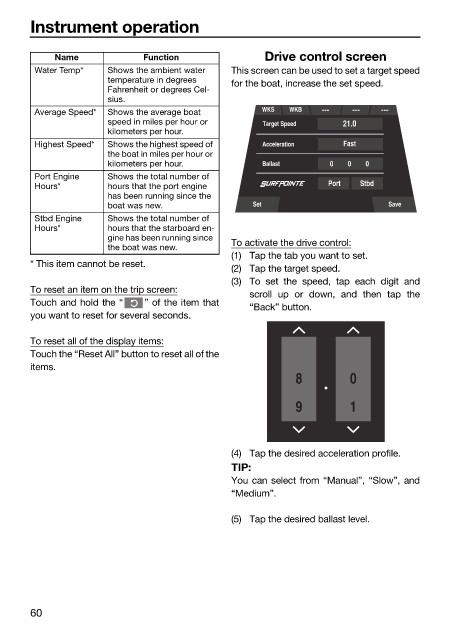
                             Name            Function               Drive control screen
                         Water Temp*   Shows the ambient water   This screen can be used to set a target speed
                                       temperature in degrees   for the boat, increase the set speed.
                                       Fahrenheit or degrees Cel-
                                       sius.
                         Average Speed*  Shows the average boat    WKS  WKB
                                       speed in miles per hour or   Target Speed  21.0
                                       kilometers per hour.
                         Highest Speed*  Shows the highest speed of   Acceleration  Fast
                                       the boat in miles per hour or
                                       kilometers per hour.        Ballast      0  0   0
                         Port Engine   Shows the total number of
                         Hours*        hours that the port engine               Port  Stbd
                                       has been running since the
                                       boat was new.              Set                      Save
                         Stbd Engine   Shows the total number of
                         Hours*        hours that the starboard en-
                                       gine has been running since
                                       the boat was new.      To activate the drive control:
                                                              (1) Tap the tab you want to set.
                        * This item cannot be reset.
                                                              (2) Tap the target speed.
                                                              (3) To set  the speed,  tap each digit and
                        To reset an item on the trip screen:
                                                                 scroll  up or down, and  then tap  the
                        Touch and hold the “  ” of the item that
                                                                 “Back” button.
                        you want to reset for several seconds.
                        To reset all of the display items:
                        Touch the “Reset All” button to reset all of the
                        items.
                                                                          8         0

                                                                          9         1


                                                              (4) Tap the desired acceleration profile.
                                                              TIP:
                                                              You can select from “Manual”, “Slow”, and
                                                              “Medium”.

                                                              (5) Tap the desired ballast level.


                        60

