


Page 157 - LIT-18626-14-02
P. 157
SportsBoat_F4Y12.book  Page 149  Tuesday, July 5, 2022  1:54 PM


                                                                Pre-operation checks

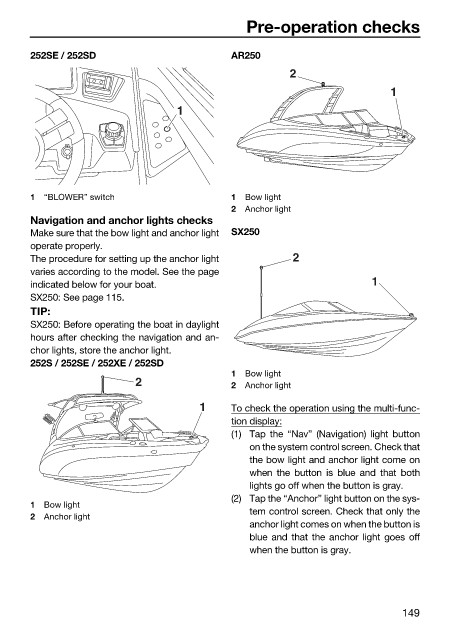
                        252SE / 252SD                         AR250
                                                                         2

                                                                                           1
                                                    1


                        1  “BLOWER” switch                    1  Bow light
                                                              2  Anchor light
                        Navigation and anchor lights checks
                        Make sure that the bow light and anchor light  SX250
                        operate properly.
                        The procedure for setting up the anchor light    2
                        varies according to the model. See the page
                        indicated below for your boat.                                  1
                        SX250: See page 115.
                        TIP:
                        SX250: Before operating the boat in daylight
                        hours after checking the navigation and an-
                        chor lights, store the anchor light.
                        252S / 252SE / 252XE / 252SD
                                                              1  Bow light
                                            2                 2  Anchor light

                                                        1     To check the operation using the multi-func-
                                                              tion display:
                                                              (1) Tap the “Nav” (Navigation) light button
                                                                 on the system control screen. Check that
                                                                 the bow light and anchor light come on
                                                                 when the button is blue  and that both
                                                                 lights go off when the button is gray.
                                                              (2) Tap the “Anchor” light button on the sys-
                        1  Bow light
                                                                 tem control screen. Check that only the
                        2  Anchor light
                                                                 anchor light comes on when the button is
                                                                 blue and that the anchor light goes off
                                                                 when the button is gray.


                                                                                             149

