


Page 180 - LIT-18626-13-49
P. 180
SportsBoat_F3R15.book  Page 171  Friday, May 14, 2021  11:12 AM


                        Pre-operation checks

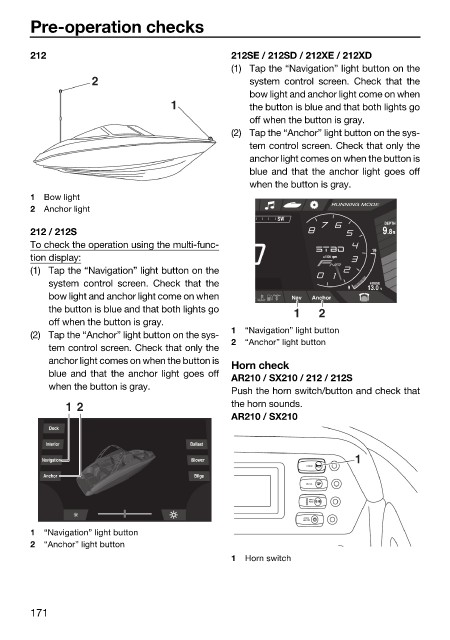
                        212                                   212SE / 212SD / 212XE / 212XD
                                                              (1) Tap the “Navigation” light button on the
                                    2                            system control screen. Check that the
                                                                 bow light and anchor light come on when
                                                  1              the button is blue and that both lights go
                                                                 off when the button is gray.
                                                              (2) Tap the “Anchor” light button on the sys-
                                                                 tem control screen. Check that only the
                                                                 anchor light comes on when the button is
                                                                 blue and that the anchor light goes off
                                                                 when the button is gray.
                        1  Bow light
                                                                                RUNNING MODE
                        2  Anchor light
                                                                      SW
                                                                                          DEPTH
                        212 / 212S                                                         .8 9  ft
                        To check the operation using the multi-func-
                                                                                        19
                        tion display:                                          x1000 rpm
                        (1) Tap the “Navigation” light button on the
                            system control screen. Check that  the                     HOUSE
                                                                                   9   13.0  V
                            bow light and anchor light come on when      Nav  Anchor
                            the button is blue and that both lights go   1    2
                            off when the button is gray.
                                                              1  “Navigation” light button
                        (2) Tap the “Anchor” light button on the sys-
                                                              2  “Anchor” light button
                            tem control screen. Check that only the
                            anchor light comes on when the button is
                                                              Horn check
                            blue and that the anchor light goes off
                                                              AR210 / SX210 / 212 / 212S
                            when the button is gray.
                                                              Push the horn switch/button and check that
                               1  2                           the horn sounds.
                                                              AR210 / SX210
                            Dock
                           Interior                   Ballast
                          Navigation                  Blower                         1
                                                                            HORN
                           Anchor                      Bilge
                                                                            BILGE
                                                                            NAVI
                                                                            ANC
                                                                           CTSY
                                                                           LIGHTS
                        1  “Navigation” light button
                        2  “Anchor” light button
                                                              1  Horn switch


                        171

