


Page 178 - LIT-18626-13-49
P. 178
SportsBoat_F3R15.book  Page 169  Friday, May 14, 2021  11:12 AM


                        Pre-operation checks


                                                                                     SE
                                                                FUEL
                                                                100 %
                                                                    19
                                                                           x1000 rpm
                                   1
                                                                   START
                                                                   13.0  V  9
                                                                             Bilge  Blower
                                                                                  1
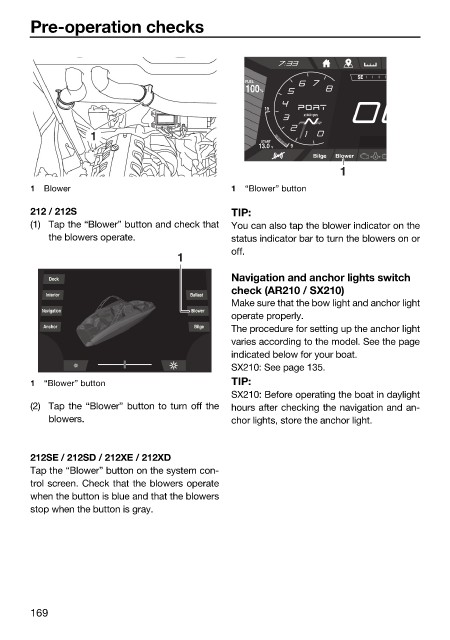
                        1  Blower                             1  “Blower” button

                        212 / 212S                            TIP:
                        (1) Tap the “Blower” button and check that  You can also tap the blower indicator on the
                            the blowers operate.              status indicator bar to turn the blowers on or
                                                              off.
                                                    1
                                                              Navigation and anchor lights switch
                            Dock
                                                              check (AR210 / SX210)
                           Interior                   Ballast
                                                              Make sure that the bow light and anchor light
                          Navigation                  Blower
                                                              operate properly.
                           Anchor                      Bilge  The procedure for setting up the anchor light
                                                              varies according to the model. See the page
                                                              indicated below for your boat.
                                                              SX210: See page 135.
                        1  “Blower” button                    TIP:
                                                              SX210: Before operating the boat in daylight
                        (2) Tap the “Blower” button to turn off the  hours after checking the navigation and an-
                            blowers.                          chor lights, store the anchor light.


                        212SE / 212SD / 212XE / 212XD
                        Tap the “Blower” button on the system con-
                        trol screen. Check that the blowers operate
                        when the button is blue and that the blowers
                        stop when the button is gray.


                        169

