


Page 120 - LIT-18626-15-36
P. 120
SportsBoat_F6D11.book Page 110 Friday, May 24, 2024 5:40 PM
Pre-operation checks
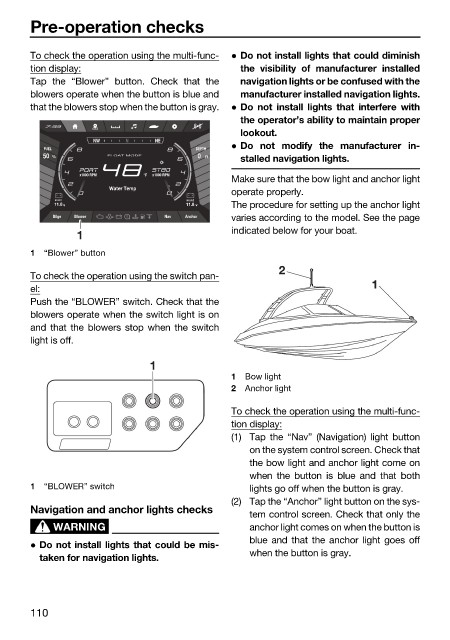
To check the operation using the multi-func- Do not install lights that could diminish
tion display: the visibility of manufacturer installed
Tap the “Blower” button. Check that the navigation lights or be confused with the
blowers operate when the button is blue and manufacturer installed navigation lights.
that the blowers stop when the button is gray. Do not install lights that interfere with
the operator’s ability to maintain proper
lookout.
NW N NE
FUEL DEPTH Do not modify the manufacturer in-
50 % FLOAT MODE 0 Ft
stalled navigation lights.
°F
Make sure that the bow light and anchor light
Water Temp
operate properly.
START HOUSE
11.8 V 11.8 V The procedure for setting up the anchor light
varies according to the model. See the page
Bilge Blower Nav Anchor
indicated below for your boat.
1
1 “Blower” button
2
To check the operation using the switch pan-
el: 1
Push the “BLOWER” switch. Check that the
blowers operate when the switch light is on
and that the blowers stop when the switch
light is off.
1
1 Bow light
2 Anchor light
To check the operation using the multi-func-
tion display:
(1) Tap the “Nav” (Navigation) light button
on the system control screen. Check that
the bow light and anchor light come on
when the button is blue and that both
1 “BLOWER” switch lights go off when the button is gray.
(2) Tap the “Anchor” light button on the sys-
Navigation and anchor lights checks
tem control screen. Check that only the
WARNING anchor light comes on when the button is
blue and that the anchor light goes off
Do not install lights that could be mis-
when the button is gray.
taken for navigation lights.
110

