Page 82 - LIT-18626-15-35
P. 82

SportsBoat_F7F10.book  Page 71  Monday, May 27, 2024  9:57 AM


                        Instrument operation


                        TIP:                                  To set the brightness:
                         The water depth can also be adjusted by  (1) Set either “Night” or “Day”.
                          tapping the “  ” or “  ” button.    (2) Move the slider control left or right to ad-
                         If the water depth is set to 0.0 m (0.0 ft), the  just.
                          depth alarm will not operate.
                                                                               1
                        (2) Tap “Back” to complete the setting.


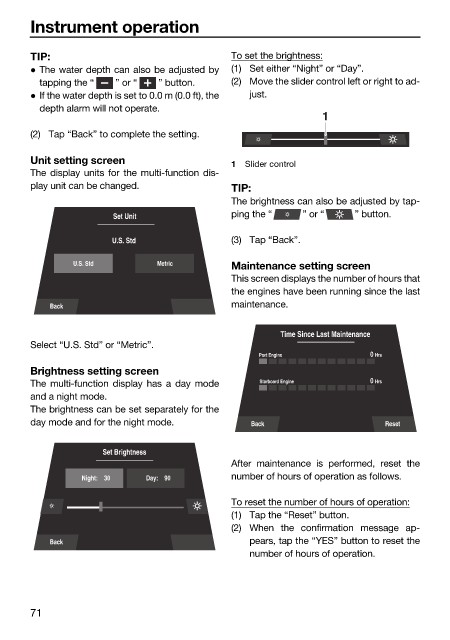
                        Unit setting screen                   1  Slider control
                        The display units for the multi-function dis-
                        play unit can be changed.             TIP:
                                                              The brightness can also be adjusted by tap-
                                        Set Unit              ping the “   ” or “    ” button.

                                       U.S. Std               (3) Tap “Back”.

                                U.S. Std        Metric
                                                              Maintenance setting screen
                                                              This screen displays the number of hours that
                                                              the engines have been running since the last
                            Back                              maintenance.

                                                                       Time Since Last Maintenance
                        Select “U.S. Std” or “Metric”.
                                                                   Port Engine          0  Hrs
                        Brightness setting screen
                        The multi-function  display has a day mode  Starboard Engine    0  Hrs
                        and a night mode.
                        The brightness can be set separately for the
                        day mode and for the night mode.         Back                     Reset


                                      Set Brightness
                                                              After maintenance  is performed, reset  the
                                  Night:    30  Day:    90    number of hours of operation as follows.
                                                              To reset the number of hours of operation:
                                                              (1) Tap the “Reset” button.
                                                              (2) When the confirmation message ap-
                            Back                                 pears, tap the “YES” button to reset the
                                                                 number of hours of operation.


                        71
   77   78   79   80   81   82   83   84   85   86   87