


Page 177 - LIT-18626-15-30
P. 177
SportsBoat_F7G11.book  Page 165  Friday, May 24, 2024  6:06 PM


                                                                Pre-operation checks

                        SX220                                    the bow light and anchor light come on
                                                                 when the button is blue  and that both
                                    2                            lights go off when the button is gray.
                                                              (2) Tap the “Anchor” light button on the sys-
                                                  1              tem control screen. Check that only the
                                                                 anchor light comes on when the button is
                                                                 blue and that the anchor light goes off
                                                                 when the button is gray.


                                                                         NW    N     NE
                                                                FUEL                        DEPTH
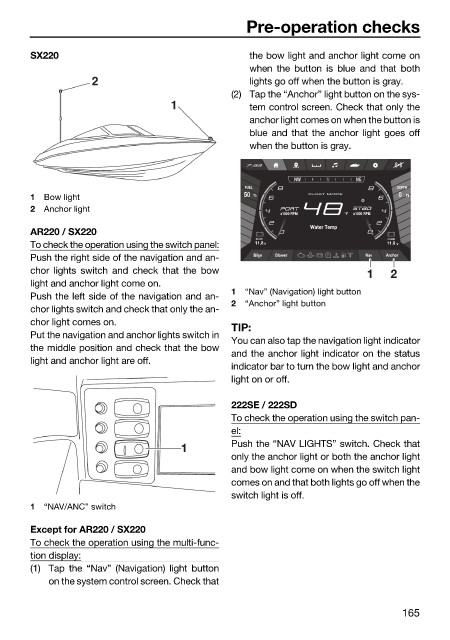
                        1  Bow light                            50  %       FLOAT MODE       0  Ft
                        2  Anchor light
                                                                                   °F
                                                                            Water Temp
                        AR220 / SX220
                                                                  START                    HOUSE
                        To check the operation using the switch panel:  11.8  V            11.8  V
                        Push the right side of the navigation and an-  Bilge  Blower   Nav  Anchor
                        chor lights switch and  check that the bow                     1   2
                        light and anchor light come on.
                                                              1  “Nav” (Navigation) light button
                        Push the left side of the navigation and an-
                                                              2  “Anchor” light button
                        chor lights switch and check that only the an-
                        chor light comes on.
                                                              TIP:
                        Put the navigation and anchor lights switch in
                                                              You can also tap the navigation light indicator
                        the middle position and check that the bow
                                                              and the anchor light indicator on the status
                        light and anchor light are off.
                                                              indicator bar to turn the bow light and anchor
                                                              light on or off.
                                                              222SE / 222SD
                                                              To check the operation using the switch pan-
                                                              el:
                                                    1         Push the “NAV LIGHTS” switch. Check that
                                                              only the anchor light or both the anchor light
                                                              and bow light come on when the switch light
                                                              comes on and that both lights go off when the
                                                              switch light is off.
                        1  “NAV/ANC” switch
                        Except for AR220 / SX220
                        To check the operation using the multi-func-
                        tion display:
                        (1) Tap the “Nav” (Navigation) light button
                            on the system control screen. Check that

                                                                                             165

