


Page 66 - LIT-18626-15-28
P. 66
SportsBoat_F4X16.book  Page 56  Monday, May 27, 2024  10:24 AM


                        Instrument operation

                        Map settings screen                        Item            Function
                        Perform settings for  waypoints  and tracks,         Changes the color of the
                        etc. on the Map Settings screen.                     waypoint.
                                                              EDIT           Changes the name of the
                        Waypoints                                            waypoint.
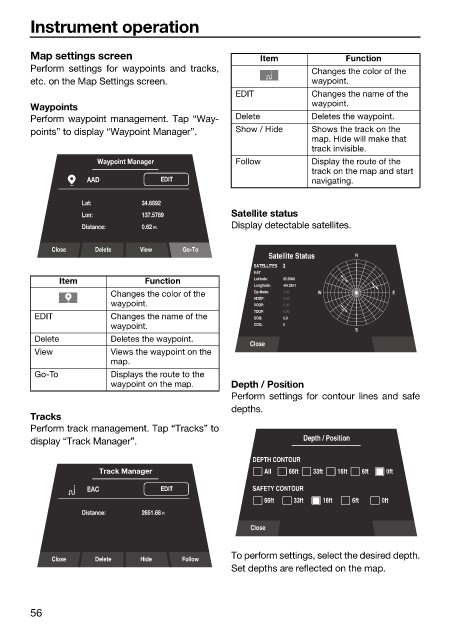
                        Perform waypoint management. Tap “Way-  Delete       Deletes the waypoint.
                        points” to display “Waypoint Manager”.  Show / Hide  Shows the track on the
                                                                             map. Hide will make that
                                                                             track invisible.
                                     Waypoint Manager         Follow         Display the route of the
                                                                             track on the map and start
                                   AAD           EDIT                        navigating.
                                  Lat:       34.6892
                                  Lon:       137.5789         Satellite status
                                  Distance:    0.62 Ft.       Display detectable satellites.

                            Close   Delete   View    Go-To
                                                                     Satellite Status  N
                                                                  SATELLITES     3
                                                                  9:47
                              Item            Function            Latitude:  35.6060
                                                                  Longitude:  -84.2541
                                       Changes the color of the   Op Mode:  0.00  W         E
                                                                  HDOP:  0.00
                                       waypoint.                  VDOP:  0.00
                                                                  TDOP:  0.00
                         EDIT          Changes the name of the    SOG:  0.0
                                       waypoint.                  COG:  0
                                                                                     S
                         Delete        Deletes the waypoint.
                                                                 Close
                         View          Views the waypoint on the
                                       map.
                         Go-To         Displays the route to the
                                       waypoint on the map.   Depth / Position
                                                              Perform settings  for contour lines and  safe
                                                              depths.
                        Tracks
                        Perform track management. Tap “Tracks” to
                        display “Track Manager”.                           Depth / Position
                                                                  DEPTH CONTOUR
                                     Track Manager                  All  66ft  33ft  16ft  6ft  0ft
                                   EAC           EDIT             SAFETY CONTOUR
                                                                    66ft  33ft  16ft  6ft  0ft
                                  Distance:    2651.68 ft
                                                                 Close


                            Close   Delete   Hide    Follow   To perform settings, select the desired depth.
                                                              Set depths are reflected on the map.


                        56

