


Page 46 - LIT-18626-14-65
P. 46
SportsBoat_F4X15.book Page 39 Friday, June 16, 2023 8:43 AM
Control function operation
Tilt lever DRiVE X mode (275SD)
WARNING Using the switches equipped on the steering
wheel, you can perform forward, reverse, and
Never touch the tilt lever during opera-
sideways movements at low speed without
tion, otherwise the steering wheel could
using the remote control levers.
suddenly change position, which may
lead to an accident.
Be sure the steering wheel is locked in 1 6
position after adjustment. If the steering 2 7
wheel is not locked in position, it may 3 8
suddenly change position during opera- 4 9
tion, which may lead to an accident.
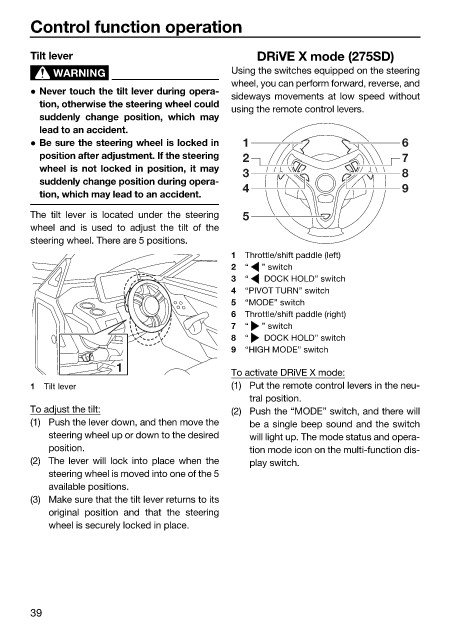
The tilt lever is located under the steering 5
wheel and is used to adjust the tilt of the
steering wheel. There are 5 positions.
1 Throttle/shift paddle (left)
2 “ ” switch
3 “ DOCK HOLD” switch
4 “PIVOT TURN” switch
5 “MODE” switch
6 Throttle/shift paddle (right)
7 “ ” switch
8 “ DOCK HOLD” switch
9 “HIGH MODE” switch
1
To activate DRiVE X mode:
1 Tilt lever (1) Put the remote control levers in the neu-
tral position.
To adjust the tilt: (2) Push the “MODE” switch, and there will
(1) Push the lever down, and then move the be a single beep sound and the switch
steering wheel up or down to the desired will light up. The mode status and opera-
position. tion mode icon on the multi-function dis-
(2) The lever will lock into place when the play switch.
steering wheel is moved into one of the 5
available positions.
(3) Make sure that the tilt lever returns to its
original position and that the steering
wheel is securely locked in place.
39

