


Page 57 - LIT-18626-14-08
P. 57
SportsBoat_F6A10.book Page 50 Tuesday, March 7, 2023 8:39 AM
Instrument operation
If the water depth is set to 0.0 m (0.0 ft), the (2) Move the slider control left or right to ad-
depth alarm will not operate. just.
(2) Tap “Back” to complete the setting.
1
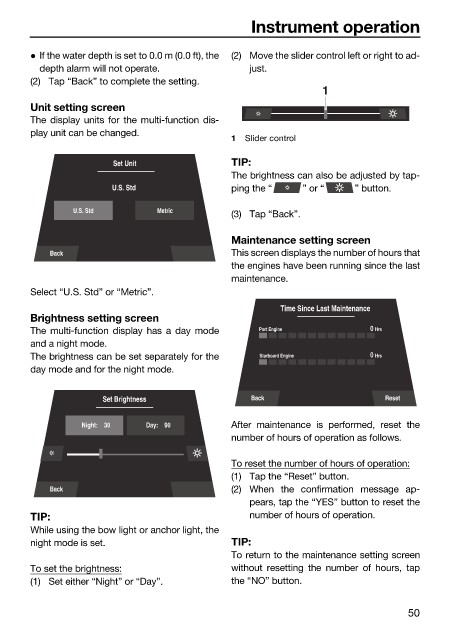
Unit setting screen
The display units for the multi-function dis-
play unit can be changed.
1 Slider control
Set Unit TIP:
The brightness can also be adjusted by tap-
U.S. Std ping the “ ” or “ ” button.
U.S. Std Metric
(3) Tap “Back”.
Maintenance setting screen
Back This screen displays the number of hours that
the engines have been running since the last
maintenance.
Select “U.S. Std” or “Metric”.
Time Since Last Maintenance
Brightness setting screen
The multi-function display has a day mode Port Engine 0 Hrs
and a night mode.
The brightness can be set separately for the Starboard Engine 0 Hrs
day mode and for the night mode.
Set Brightness Back Reset
Night: 30 Day: 90 After maintenance is performed, reset the
number of hours of operation as follows.
To reset the number of hours of operation:
(1) Tap the “Reset” button.
Back (2) When the confirmation message ap-
pears, tap the “YES” button to reset the
TIP: number of hours of operation.
While using the bow light or anchor light, the
night mode is set. TIP:
To return to the maintenance setting screen
To set the brightness: without resetting the number of hours, tap
(1) Set either “Night” or “Day”. the “NO” button.
50

