


Page 56 - LIT-18626-14-08
P. 56
SportsBoat_F6A10.book Page 49 Tuesday, March 7, 2023 8:39 AM
Instrument operation
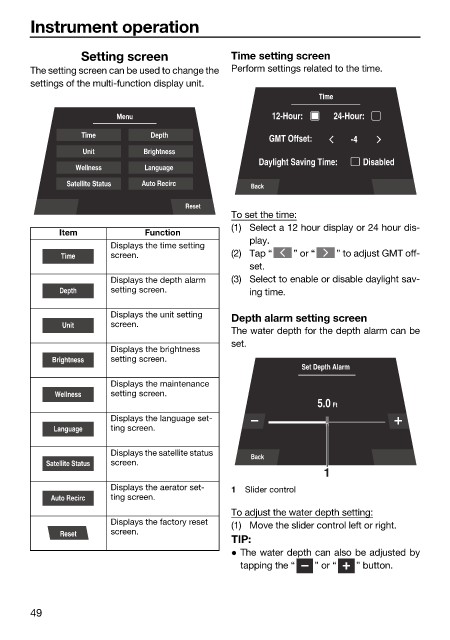
Setting screen Time setting screen
The setting screen can be used to change the Perform settings related to the time.
settings of the multi-function display unit.
Time
Menu 12-Hour: 24-Hour:
Time Depth
GMT Offset: -4
Unit Brightness
Daylight Saving Time: Disabled
Wellness Language
Satellite Status Auto Recirc
Back
Reset
To set the time:
(1) Select a 12 hour display or 24 hour dis-
Item Function
play.
Displays the time setting
Time screen. (2) Tap “ ” or “ ” to adjust GMT off-
set.
Displays the depth alarm (3) Select to enable or disable daylight sav-
Depth setting screen. ing time.
Displays the unit setting Depth alarm setting screen
Unit screen.
The water depth for the depth alarm can be
set.
Displays the brightness
Brightness setting screen.
Set Depth Alarm
Displays the maintenance
Wellness setting screen.
5.0 Ft
Displays the language set-
Language ting screen.
Displays the satellite status Back
Satellite Status screen.
1
Displays the aerator set- 1 Slider control
Auto Recirc ting screen.
To adjust the water depth setting:
Displays the factory reset (1) Move the slider control left or right.
Reset screen.
TIP:
The water depth can also be adjusted by
tapping the “ ” or “ ” button.
49

