


Page 73 - LIT-18626-14-07
P. 73
SportsBoat_F4X14.book  Page 66  Tuesday, July 5, 2022  1:30 PM


                                                                 Instrument operation

                                                              Factory reset screen
                                    Auto Volume Settings      This screen can be set to the factory settings.

                              Auto Volume Status:  Off
                                                                     Are you sure you would like to reset to
                                                                           factory settings?
                                Intensity:     1
                                                                        You cannot undo this action!

                            Back

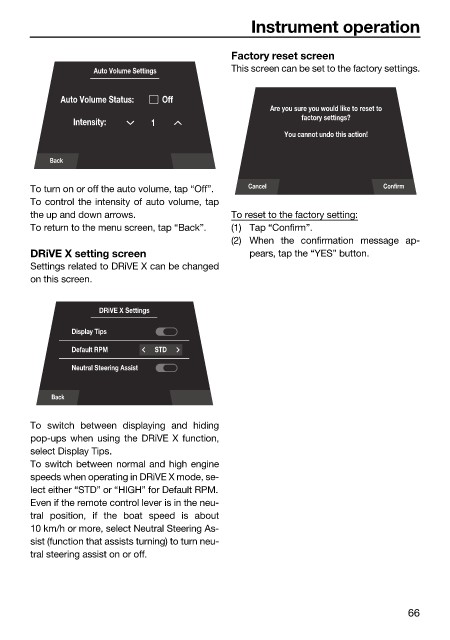
                        To turn on or off the auto volume, tap “Off”.  Cancel             Confirm
                        To control the intensity of auto volume, tap
                        the up and down arrows.               To reset to the factory setting:
                        To return to the menu screen, tap “Back”.  (1) Tap “Confirm”.
                                                              (2) When the confirmation message ap-
                        DRiVE X setting screen                   pears, tap the “YES” button.
                        Settings related to DRiVE X can be changed
                        on this screen.


                                     DRiVE X Settings

                                Display Tips
                                Default RPM    STD
                                Neutral Steering Assist

                            Back

                        To  switch between displaying  and hiding
                        pop-ups when using the DRiVE X function,
                        select Display Tips.
                        To switch between normal and high engine
                        speeds when operating in DRiVE X mode, se-
                        lect either “STD” or “HIGH” for Default RPM.
                        Even if the remote control lever is in the neu-
                        tral  position, if the boat speed  is about
                        10 km/h or more, select Neutral Steering As-
                        sist (function that assists turning) to turn neu-
                        tral steering assist on or off.


                                                                                               66

