


Page 69 - LIT-18626-14-07
P. 69
SportsBoat_F4X14.book Page 62 Tuesday, July 5, 2022 1:30 PM
Instrument operation
System control screen
1
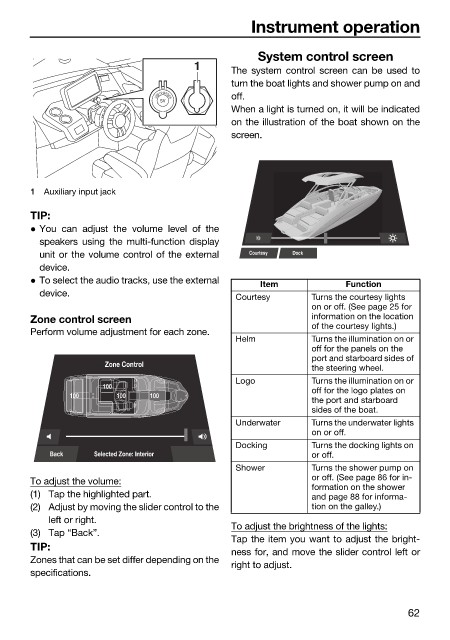
The system control screen can be used to
turn the boat lights and shower pump on and
off.
5V
When a light is turned on, it will be indicated
on the illustration of the boat shown on the
screen.
1 Auxiliary input jack
TIP:
You can adjust the volume level of the
speakers using the multi-function display
unit or the volume control of the external Courtesy Dock
device.
To select the audio tracks, use the external Item Function
device. Courtesy Turns the courtesy lights
on or off. (See page 25 for
Zone control screen information on the location
of the courtesy lights.)
Perform volume adjustment for each zone.
Helm Turns the illumination on or
off for the panels on the
port and starboard sides of
Zone Control the steering wheel.
Logo Turns the illumination on or
100 off for the logo plates on
100 100 100
the port and starboard
sides of the boat.
Underwater Turns the underwater lights
on or off.
Docking Turns the docking lights on
Back Selected Zone: Interior or off.
Shower Turns the shower pump on
To adjust the volume: or off. (See page 86 for in-
formation on the shower
(1) Tap the highlighted part. and page 88 for informa-
(2) Adjust by moving the slider control to the tion on the galley.)
left or right.
To adjust the brightness of the lights:
(3) Tap “Back”.
Tap the item you want to adjust the bright-
TIP:
ness for, and move the slider control left or
Zones that can be set differ depending on the
right to adjust.
specifications.
62

