


Page 173 - LIT-18626-14-03
P. 173
SportsBoat_F6D10.book  Page 164  Thursday, July 14, 2022  4:15 PM


                                                                Pre-operation checks

                        Except for SX220


                                 2
                                                  1

                                                                                          1


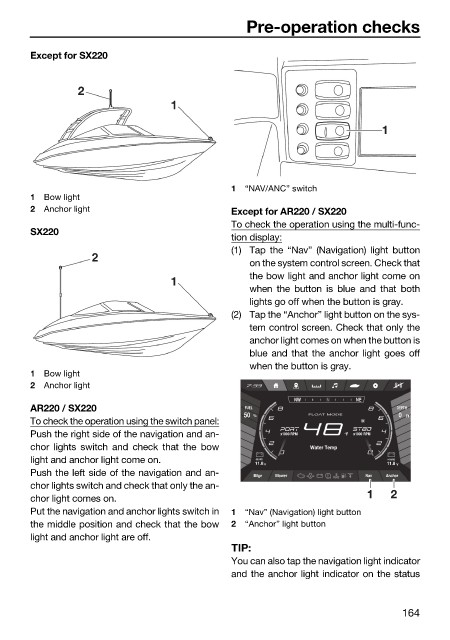
                                                              1  “NAV/ANC” switch
                        1  Bow light
                        2  Anchor light                       Except for AR220 / SX220
                                                              To check the operation using the multi-func-
                        SX220
                                                              tion display:
                                                              (1) Tap the “Nav” (Navigation) light button
                                    2
                                                                 on the system control screen. Check that
                                                                 the bow light and anchor light come on
                                                  1
                                                                 when the button is blue  and that both
                                                                 lights go off when the button is gray.
                                                              (2) Tap the “Anchor” light button on the sys-
                                                                 tem control screen. Check that only the
                                                                 anchor light comes on when the button is
                                                                 blue and that the anchor light goes off
                                                                 when the button is gray.
                        1  Bow light
                        2  Anchor light
                                                                         NW    N     NE
                        AR220 / SX220                           FUEL                        DEPTH
                                                                50  %       FLOAT MODE       0  Ft
                        To check the operation using the switch panel:
                        Push the right side of the navigation and an-              °F
                        chor lights switch and  check that the bow          Water Temp
                        light and anchor light come on.           11.8  V                  11.8  V
                                                                                           HOUSE
                                                                  START
                        Push the left side of the navigation and an-  Bilge  Blower    Nav  Anchor
                        chor lights switch and check that only the an-
                        chor light comes on.                                           1   2
                        Put the navigation and anchor lights switch in  1  “Nav” (Navigation) light button
                        the middle position and check that the bow  2  “Anchor” light button
                        light and anchor light are off.
                                                              TIP:
                                                              You can also tap the navigation light indicator
                                                              and the anchor light indicator on the status


                                                                                             164

