


Page 172 - LIT-18626-14-03
P. 172
SportsBoat_F6D10.book Page 163 Thursday, July 14, 2022 4:15 PM
Pre-operation checks
1
1
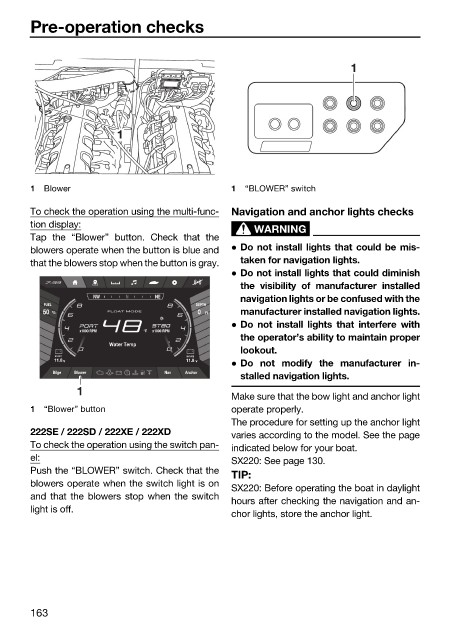
1 Blower 1 “BLOWER” switch
To check the operation using the multi-func- Navigation and anchor lights checks
tion display:
WARNING
Tap the “Blower” button. Check that the
blowers operate when the button is blue and Do not install lights that could be mis-
that the blowers stop when the button is gray. taken for navigation lights.
Do not install lights that could diminish
the visibility of manufacturer installed
NW N NE navigation lights or be confused with the
FUEL DEPTH
50 % FLOAT MODE 0 Ft manufacturer installed navigation lights.
Do not install lights that interfere with
°F
the operator’s ability to maintain proper
Water Temp
lookout.
START HOUSE
11.8 V 11.8 V
Do not modify the manufacturer in-
Bilge Blower Nav Anchor
stalled navigation lights.
1
Make sure that the bow light and anchor light
1 “Blower” button operate properly.
The procedure for setting up the anchor light
222SE / 222SD / 222XE / 222XD varies according to the model. See the page
To check the operation using the switch pan- indicated below for your boat.
el: SX220: See page 130.
Push the “BLOWER” switch. Check that the
TIP:
blowers operate when the switch light is on
SX220: Before operating the boat in daylight
and that the blowers stop when the switch
hours after checking the navigation and an-
light is off.
chor lights, store the anchor light.
163

