


Page 57 - LIT-18626-15-36
P. 57
SportsBoat_F6D11.book  Page 47  Friday, May 24, 2024  5:40 PM


                                                                 Instrument operation

                        (2) Push the joystick knob to select an item  Operation buttons
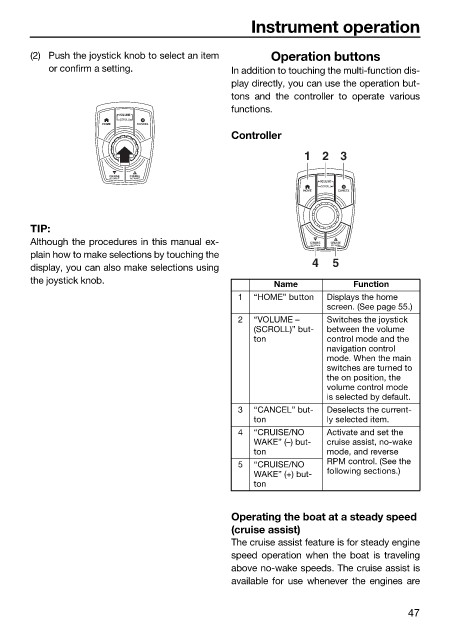
                            or confirm a setting.             In addition to touching the multi-function dis-
                                                              play directly, you can use the operation but-
                                                              tons and the controller to operate  various
                                                              functions.
                                         VOLUME
                                         (SCROLL)
                                      HOME  CANCEL
                                                              Controller
                                                                           1   2 3

                                       CRUISE  CRUISE
                                       NO WAKE  NO WAKE
                                                                              VOLUME
                                                                              (SCROLL)
                                                                           HOME   CANCEL
                        TIP:
                        Although the procedures in this manual ex-          CRUISE  CRUISE
                                                                            NO WAKE
                                                                                NO WAKE
                        plain how to make selections by touching the
                                                                             4   5
                        display, you can also make selections using
                        the joystick knob.                            Name          Function
                                                               1  “HOME” button  Displays the home
                                                                               screen. (See page 55.)
                                                               2  “VOLUME  –   Switches the joystick
                                                                  (SCROLL)” but-  between the volume
                                                                  ton          control mode and the
                                                                               navigation control
                                                                               mode. When the main
                                                                               switches are turned to
                                                                               the on position, the
                                                                               volume control mode
                                                                               is selected by default.
                                                               3  “CANCEL” but-  Deselects the current-
                                                                  ton          ly selected item.
                                                               4  “CRUISE/NO   Activate and set the
                                                                  WAKE” (–) but-  cruise assist, no-wake
                                                                  ton          mode, and reverse
                                                               5  “CRUISE/NO   RPM control. (See the
                                                                  WAKE” (+) but-  following sections.)
                                                                  ton


                                                              Operating the boat at a steady speed
                                                              (cruise assist)
                                                              The cruise assist feature is for steady engine
                                                              speed operation when the boat is traveling
                                                              above no-wake speeds. The cruise assist is
                                                              available for use whenever the engines are


                                                                                               47

