


Page 67 - LIT-18626-15-35
P. 67
SportsBoat_F7F10.book  Page 56  Monday, May 27, 2024  9:57 AM


                                                                 Instrument operation

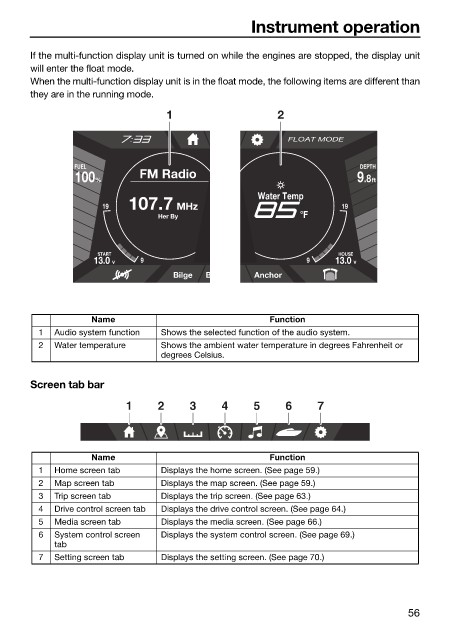
                        If the multi-function display unit is turned on while the engines are stopped, the display unit
                        will enter the float mode.
                        When the multi-function display unit is in the float mode, the following items are different than
                        they are in the running mode.
                                                  1                   2

                                                                        FLOAT MODE

                                FUEL                                                  DEPTH
                                 100 %       FM Radio                                 .8 9  ft

                                                                   Water Temp
                                      19  107.7 MHz                               19
                                                Her By                    °F


                                     START                                        HOUSE
                                    13.0  V  9                              9    13.0  V
                                                   Bilge  B       Anchor


                                    Name                             Function
                          1  Audio system function  Shows the selected function of the audio system.
                          2  Water temperature   Shows the ambient water temperature in degrees Fahrenheit or
                                                 degrees Celsius.


                        Screen tab bar
                                          1     2     3     4     5     6     7


                                    Name                             Function
                          1  Home screen tab     Displays the home screen. (See page 59.)
                          2  Map screen tab      Displays the map screen. (See page 59.)
                          3  Trip screen tab     Displays the trip screen. (See page 63.)
                          4  Drive control screen tab  Displays the drive control screen. (See page 64.)
                          5  Media screen tab    Displays the media screen. (See page 66.)
                          6  System control screen   Displays the system control screen. (See page 69.)
                             tab
                          7  Setting screen tab  Displays the setting screen. (See page 70.)


                                                                                               56

