Page 65 - LIT-18626-15-32
P. 65

SportsBoat_F6H15.book  Page 55  Tuesday, June 4, 2024  5:17 PM


                                                                 Instrument operation

                          unit or the volume control of the external   Setting screen
                          device.                             The setting screen can be used to change the
                         To select the audio tracks, use the external  settings of the multi-function display unit.
                          device.

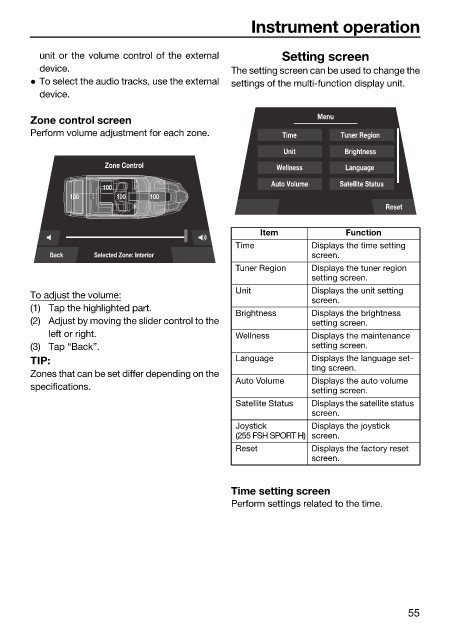
                        Zone control screen                                   Menu
                        Perform volume adjustment for each zone.       Time       Tuner Region

                                                                       Unit        Brightness
                                      Zone Control                    Wellness     Language
                                                                     Auto Volume  Satellite Status
                                      100
                                100     100   100
                                                                                          Reset

                                                                   Item            Function
                                                              Time           Displays the time setting
                            Back    Selected Zone: Interior                  screen.
                                                              Tuner Region   Displays the tuner region
                                                                             setting screen.
                                                              Unit           Displays the unit setting
                        To adjust the volume:
                                                                             screen.
                        (1) Tap the highlighted part.
                                                              Brightness     Displays the brightness
                        (2) Adjust by moving the slider control to the       setting screen.
                            left or right.                    Wellness       Displays the maintenance
                        (3) Tap “Back”.                                      setting screen.
                        TIP:                                  Language       Displays the language set-
                                                                             ting screen.
                        Zones that can be set differ depending on the
                                                              Auto Volume    Displays the auto volume
                        specifications.                                      setting screen.
                                                              Satellite Status  Displays the satellite status
                                                                             screen.
                                                              Joystick       Displays the joystick
                                                              (255 FSH SPORT H) screen.
                                                              Reset          Displays the factory reset
                                                                             screen.


                                                              Time setting screen
                                                              Perform settings related to the time.


                                                                                               55
   60   61   62   63   64   65   66   67   68   69   70