Page 102 - LIT-18626-15-29
P. 102

SportsBoat_F5K15.book  Page 91  Wednesday, May 22, 2024  1:58 PM


                        Instrument operation

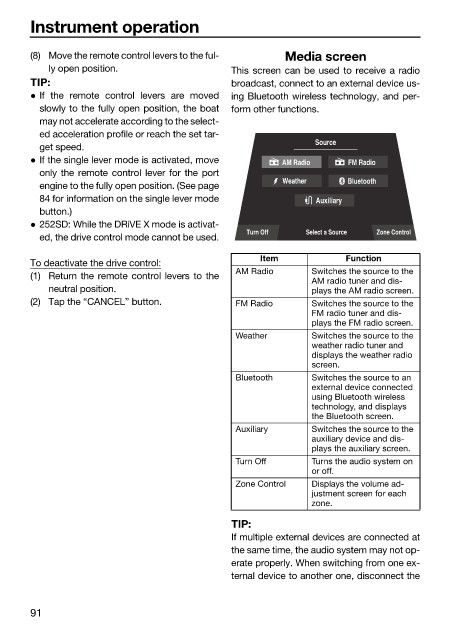
                        (8) Move the remote control levers to the ful-  Media screen
                            ly open position.                 This screen can be used to receive a radio
                        TIP:                                  broadcast, connect to an external device us-
                         If the remote control levers are moved  ing Bluetooth wireless technology, and per-
                          slowly to the fully open position, the boat  form other functions.
                          may not accelerate according to the select-
                          ed acceleration profile or reach the set tar-
                                                                             Source
                          get speed.
                         If the single lever mode is activated, move  AM Radio    FM Radio
                          only the remote control lever for the port
                                                                       Weather     Bluetooth
                          engine to the fully open position. (See page
                          84 for information on the single lever mode        Auxiliary
                          button.)
                         252SD: While the DRiVE X mode is activat-
                                                                 Turn Off   Select a Source  Zone Control
                          ed, the drive control mode cannot be used.
                                                                   Item            Function
                        To deactivate the drive control:
                                                              AM Radio       Switches the source to the
                        (1) Return the remote control levers to the
                                                                             AM radio tuner and dis-
                            neutral position.                                plays the AM radio screen.
                        (2) Tap the “CANCEL” button.          FM Radio       Switches the source to the
                                                                             FM radio tuner and dis-
                                                                             plays the FM radio screen.
                                                              Weather        Switches the source to the
                                                                             weather radio tuner and
                                                                             displays the weather radio
                                                                             screen.
                                                              Bluetooth      Switches the source to an
                                                                             external device connected
                                                                             using Bluetooth wireless
                                                                             technology, and displays
                                                                             the Bluetooth screen.
                                                              Auxiliary      Switches the source to the
                                                                             auxiliary device and dis-
                                                                             plays the auxiliary screen.
                                                              Turn Off       Turns the audio system on
                                                                             or off.
                                                              Zone Control   Displays the volume ad-
                                                                             justment screen for each
                                                                             zone.
                                                              TIP:
                                                              If multiple external devices are connected at
                                                              the same time, the audio system may not op-
                                                              erate properly. When switching from one ex-
                                                              ternal device to another one, disconnect the


                        91
   97   98   99   100   101   102   103   104   105   106   107