


Page 65 - LIT-18626-14-65
P. 65
SportsBoat_F4X15.book  Page 58  Friday, June 16, 2023  8:43 AM


                                                                 Instrument operation


                             Name            Function               Drive control screen
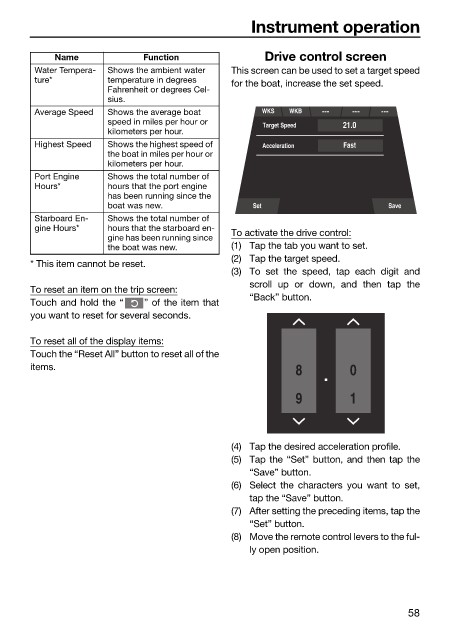
                         Water Tempera-  Shows the ambient water   This screen can be used to set a target speed
                         ture*         temperature in degrees   for the boat, increase the set speed.
                                       Fahrenheit or degrees Cel-
                                       sius.
                         Average Speed  Shows the average boat     WKS  WKB
                                       speed in miles per hour or   Target Speed  21.0
                                       kilometers per hour.
                         Highest Speed  Shows the highest speed of   Acceleration  Fast
                                       the boat in miles per hour or
                                       kilometers per hour.
                         Port Engine   Shows the total number of
                         Hours*        hours that the port engine
                                       has been running since the
                                       boat was new.              Set                      Save
                         Starboard En-  Shows the total number of
                         gine Hours*   hours that the starboard en-
                                       gine has been running since   To activate the drive control:
                                       the boat was new.      (1) Tap the tab you want to set.
                                                              (2) Tap the target speed.
                        * This item cannot be reset.
                                                              (3) To set  the speed,  tap each digit and
                                                                 scroll  up or down, and  then tap  the
                        To reset an item on the trip screen:
                                                                 “Back” button.
                        Touch and hold the “  ” of the item that
                        you want to reset for several seconds.

                        To reset all of the display items:
                        Touch the “Reset All” button to reset all of the
                        items.                                            8         0

                                                                          9         1


                                                              (4) Tap the desired acceleration profile.
                                                              (5) Tap the “Set” button, and then tap the
                                                                 “Save” button.
                                                              (6) Select the characters you want to  set,
                                                                 tap the “Save” button.
                                                              (7) After setting the preceding items, tap the
                                                                 “Set” button.
                                                              (8) Move the remote control levers to the ful-
                                                                 ly open position.


                                                                                               58

