


Page 113 - LIT-18626-14-07
P. 113
SportsBoat_F4X14.book  Page 106  Tuesday, July 5, 2022  1:30 PM


                                                                Pre-operation checks

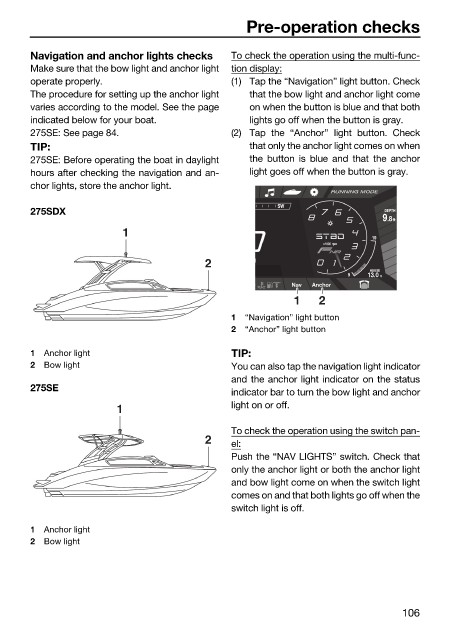
                        Navigation and anchor lights checks   To check the operation using the multi-func-
                        Make sure that the bow light and anchor light  tion display:
                        operate properly.                     (1) Tap the “Navigation” light button. Check
                        The procedure for setting up the anchor light  that the bow light and anchor light come
                        varies according to the model. See the page  on when the button is blue and that both
                        indicated below for your boat.           lights go off when the button is gray.
                        275SE: See page 84.                   (2) Tap the “Anchor” light button.  Check
                        TIP:                                     that only the anchor light comes on when
                        275SE: Before operating the boat in daylight  the button is blue and  that the  anchor
                        hours after checking the navigation and an-  light goes off when the button is gray.
                        chor lights, store the anchor light.
                                                                                RUNNING MODE
                                                                      SW
                        275SDX                                                            DEPTH
                                                                                           .8 9  ft
                                         1
                                                                                        19
                                                                               x1000 rpm
                                                         2       H
                                                                                       HOUSE
                                                                                   9   13.0  V
                                                                         Nav  Anchor
                                                                         1    2
                                                              1  “Navigation” light button
                                                              2  “Anchor” light button

                        1  Anchor light                       TIP:
                        2  Bow light                          You can also tap the navigation light indicator
                                                              and the anchor light indicator on the status
                        275SE
                                                              indicator bar to turn the bow light and anchor
                                        1                     light on or off.

                                                              To check the operation using the switch pan-
                                                         2    el:
                                                              Push the “NAV LIGHTS” switch. Check that
                                                              only the anchor light or both the anchor light
                                                              and bow light come on when the switch light
                                                              comes on and that both lights go off when the
                                                              switch light is off.

                        1  Anchor light
                        2  Bow light


                                                                                             106

