


Page 50 - LIT-18626-14-05
P. 50
SportsBoat_F6H12.book  Page 43  Thursday, May 26, 2022  10:21 AM


                        Instrument operation

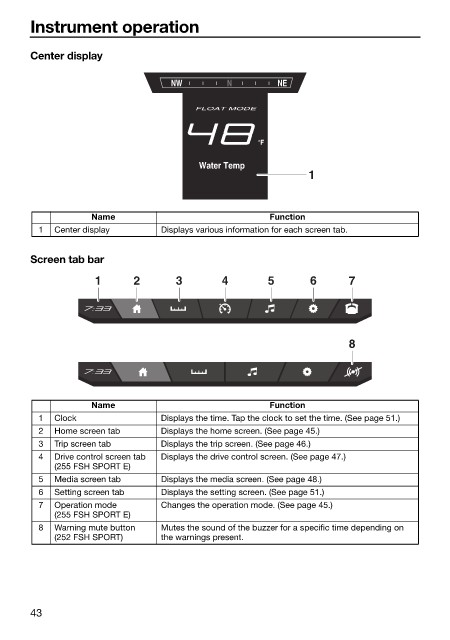
                        Center display


                                                  NW         N        NE

                                                       FLOAT MODE


                                                                   °F
                                                        Water Temp
                                                                            1


                                    Name                             Function
                          1  Center display      Displays various information for each screen tab.

                        Screen tab bar

                                    1      2       3        4       5       6       7


                                                                                    8


                                    Name                             Function
                          1  Clock               Displays the time. Tap the clock to set the time. (See page 51.)
                          2  Home screen tab     Displays the home screen. (See page 45.)
                          3  Trip screen tab     Displays the trip screen. (See page 46.)
                          4  Drive control screen tab   Displays the drive control screen. (See page 47.)
                             (255 FSH SPORT E)
                          5  Media screen tab    Displays the media screen. (See page 48.)
                          6  Setting screen tab  Displays the setting screen. (See page 51.)
                          7  Operation  mode     Changes the operation mode. (See page 45.)
                             (255 FSH SPORT E)
                          8  Warning mute button   Mutes the sound of the buzzer for a specific time depending on
                             (252 FSH SPORT)     the warnings present.


                        43

