


Page 102 - LIT-18626-14-02
P. 102
SportsBoat_F4Y12.book  Page 94  Tuesday, July 5, 2022  1:54 PM


                        Instrument operation

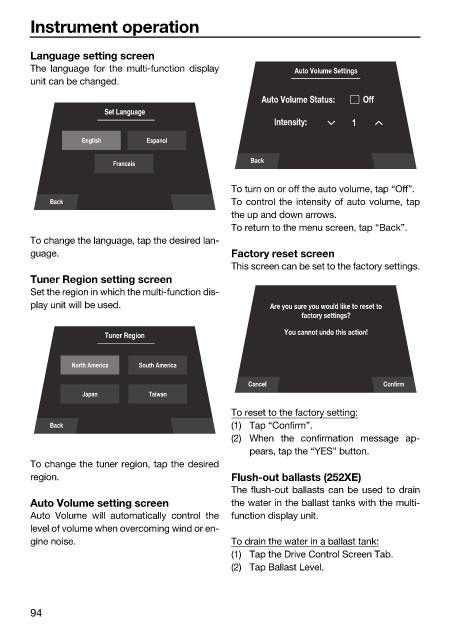
                        Language setting screen
                        The language for the  multi-function  display    Auto Volume Settings
                        unit can be changed.
                                                                   Auto Volume Status:  Off
                                      Set Language
                                                                      Intensity:    1
                                  English     Espanol

                                                                 Back
                                        Francais
                                                              To turn on or off the auto volume, tap “Off”.
                            Back                              To control the intensity of auto volume, tap
                                                              the up and down arrows.
                                                              To return to the menu screen, tap “Back”.
                        To change the language, tap the desired lan-
                        guage.                                Factory reset screen
                                                              This screen can be set to the factory settings.
                        Tuner Region setting screen
                        Set the region in which the multi-function dis-
                        play unit will be used.                      Are you sure you would like to reset to
                                                                           factory settings?
                                                                        You cannot undo this action!
                                      Tuner Region

                                North America  South America
                                                                 Cancel                   Confirm
                                  Japan       Taiwan
                                                              To reset to the factory setting:
                            Back                              (1) Tap “Confirm”.
                                                              (2) When the confirmation message ap-
                                                                 pears, tap the “YES” button.
                        To change the tuner region, tap the desired
                        region.                               Flush-out ballasts (252XE)
                                                              The flush-out ballasts can be used to drain
                        Auto Volume setting screen            the water in the ballast tanks with the multi-
                        Auto Volume  will automatically  control the  function display unit.
                        level of volume when overcoming wind or en-
                        gine noise.                           To drain the water in a ballast tank:
                                                              (1) Tap the Drive Control Screen Tab.
                                                              (2) Tap Ballast Level.


                        94

