Page 70 - LIT-18626-14-01
P. 70

SportsBoat_F5K12.book  Page 63  Monday, July 4, 2022  11:40 AM


                        Instrument operation

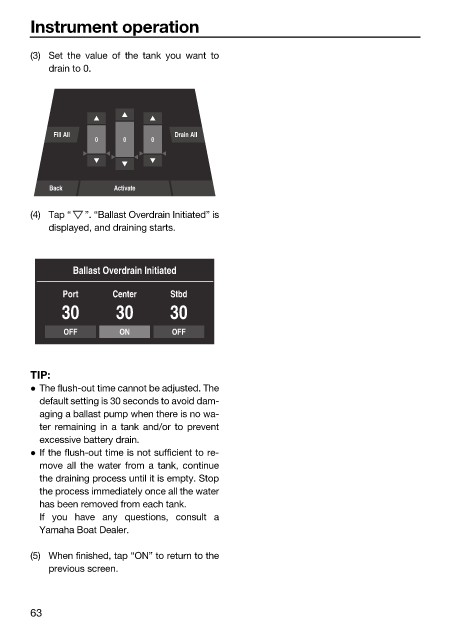
                        (3) Set the value of  the tank you  want  to
                            drain to 0.


                             Fill All              Drain All
                                    0     0    0


                            Back        Activate

                        (4) Tap “  ”. “Ballast Overdrain Initiated” is
                            displayed, and draining starts.


                                Ballast Overdrain Initiated

                              Port      Center    Stbd
                              30        30        30

                              OFF        ON        OFF


                        TIP:
                         The flush-out time cannot be adjusted. The
                          default setting is 30 seconds to avoid dam-
                          aging a ballast pump when there is no wa-
                          ter remaining in a tank and/or to prevent
                          excessive battery drain.
                         If the flush-out time is not sufficient to re-
                          move all the water from a tank, continue
                          the draining process until it is empty. Stop
                          the process immediately once all the water
                          has been removed from each tank.
                          If you have  any questions, consult a
                          Yamaha Boat Dealer.

                        (5) When finished, tap “ON” to return to the
                            previous screen.


                        63
   65   66   67   68   69   70   71   72   73   74   75